

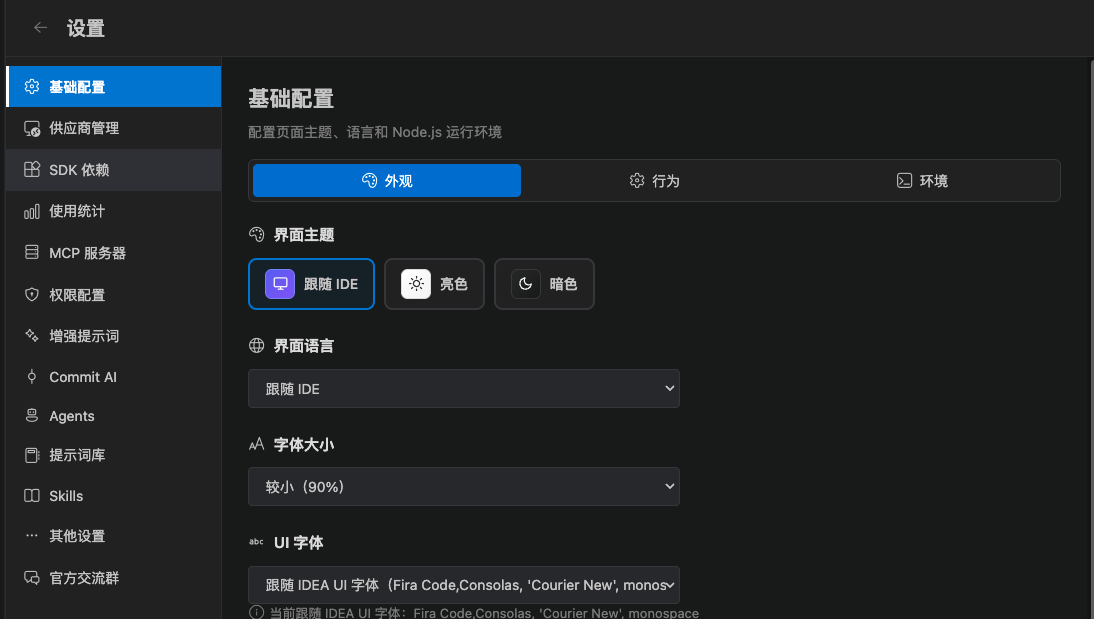
13 entries
General
Three subtabs.Appearance
- Theme: follow the IDE / light / dark
- Language: follow the IDE, or lock Chinese, English, and so on
- Font size, UI font, code font
- Chat background, user message color, chat bar color
- Diff theme
Behavior
- Streaming
- Send shortcut
- Send the open file path
- Expand diffs by default
- Confirm before starting a new session
- Detailed output
- Task-complete notification / sound
- System notification when asking the user
- Permission and question dialog timeout (30–3600 seconds)
- Debug log (maps to
ccGui.enableDebugLog) - Master switch for AI-generated commit messages
Environment
- Extension-only Node.js path (
ccGui.nodePath) - Claude CLI path override
- Working directory
Usage
Shows token use, estimated cost, and trends. Cost depends on the unit prices you enter on the provider or a custom model.Other
- History input completion: suggest from history, accept with
Tab. You can add or delete records and change importance - Auto-generate session titles: after the first turn, Haiku writes a short title
3 keys in VS Code settings
SearchccGui in VS Code settings:
Most options still live in CC GUI’s own Settings page. These 3 keys are what the extension host needs to read early.