

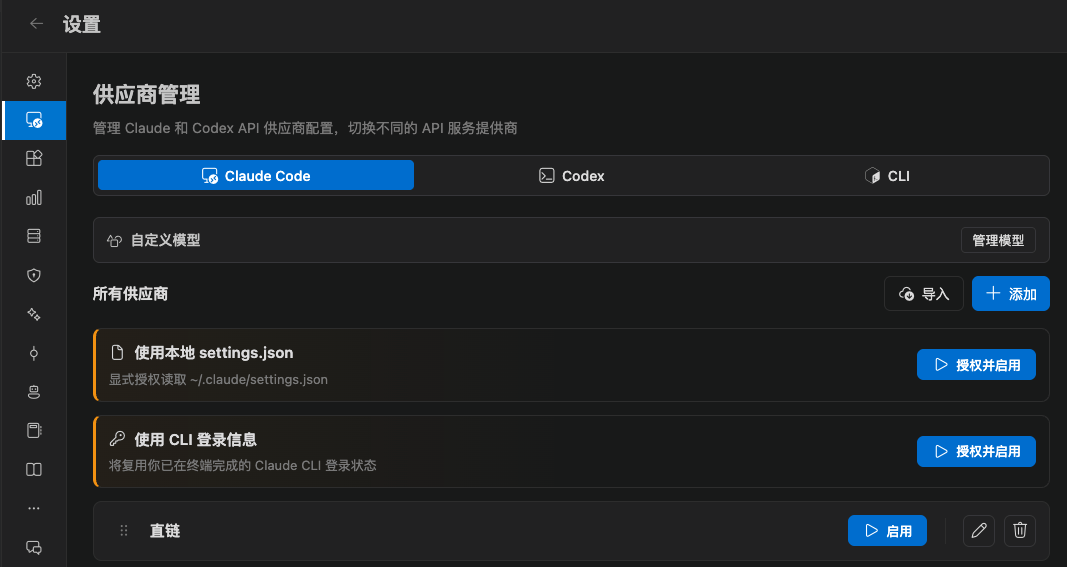
Four ways to connect
1. Add a provider (most common)
Click Add provider and fill in:- Provider name
- API key
- Request URL (official direct is always
https://api.anthropic.com) - Optional: primary model, Haiku / Sonnet / Opus / Fable mappings, custom models
settings.json fields.
Official direct sends requests to Anthropic. A third-party preset immediately routes them to that proxy endpoint.
Built-in presets include Zhipu GLM, Kimi, DeepSeek, MiniMax, Xiaomi MiMo, Alibaba Qwen, OpenRouter, Bailian, LongCat, OpenCode Go, and more. After you pick a preset you still enter your own key.
These settings stay on your computer. The extension does not upload keys to a CC GUI server.
2. Use local settings.json
Use this if you already maintain~/.claude/settings.json.
- The extension does not read this file by default
- It reads once after you click Authorize and enable
- The extension does not modify the file
- You can revoke access at any time. After that, Claude stays disabled until you enable another provider
3. Use CLI login
Use this for a Claude subscription account:- Sign in to the Claude CLI in a system terminal and confirm you can ask a question
- Keep
envempty in~/.claude/settings.json - In CC GUI, authorize Use CLI login
- Restart VS Code if you hit a problem
env to a proxy:
4. Import from another tool
The provider page supports:- Import from a cc-switch database or CLI
- Import from Claude Code Router
Models
The model picker under the input box lists models for the current provider. Custom models come first. In Settings → Provider management you can also add prices to existing models (USD / million tokens) so Usage can estimate cost. Models that come from a provider orsettings.json can only have their price changed. You cannot delete them here.
Working directory and CLI override
In Settings → General → Environment:- Working directory: relative to the workspace root, or an absolute path. Leave empty to use the workspace root
- Claude CLI path (override): when set, the extension starts that binary instead of the bundled SDK. Saving restarts the daemon