

Four modes
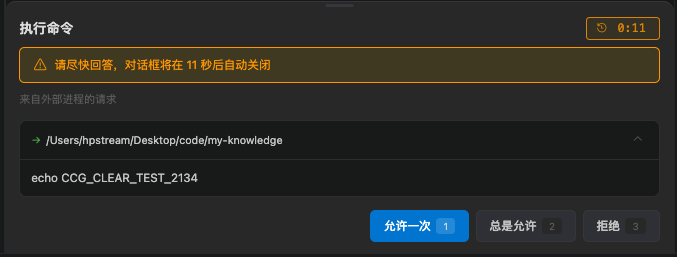
How to answer a permission dialog
Default mode and some Agent actions open a permission dialog:
Requests from an external process are labeled separately. The dialog has a countdown. After timeout it closes and the model continues with the current policy. Set the seconds in Settings → General → Behavior → Permission and question dialog timeout, from 30–3600.
When the model asks you a multiple-choice question, it uses the Ask user dialog. Turn on system notifications in Settings so you do not miss it in another window.
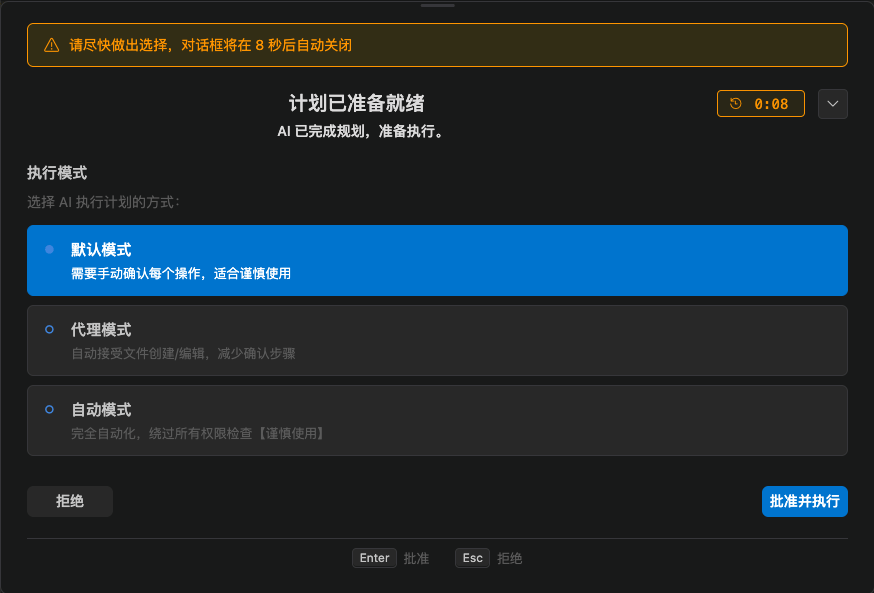
Plan mode
Plan mode only gives the model read-only tools. It analyzes the code, writes a plan, then waits for your approval. Typical flow:- Switch to Plan
- Describe the change
- Review the plan and ask for another version if needed
- Approve or reject it in the approval box
- After approval, let it execute
Codex sandbox
Codex also has a sandbox policy in Settings → Permissions. It is a second layer on top of chat mode:- Mode: whether to ask you
- Sandbox: which directories and network the command can actually touch
How this relates to VS Code settings
The extension also has these related switches:ccGui.autoSyncActiveFile: whether to sync the current editor file path automatically- Send the open file path: whether to mention a file automatically when you select it in Explorer
- Debug log: turn this on when you debug permissions or the bridge