> ## Documentation Index
> Fetch the complete documentation index at: https://docs.mossx.ai/llms.txt
> Use this file to discover all available pages before exploring further.
# Install the extension
> Install CCGUI from the VS Code Marketplace and open the sidebar.
CC GUI for VS Code ships as an extension. The publisher is **MossX**, and the extension ID is `MossX.vscode-cc-gui`.
## Prerequisites
* [Visual Studio Code](https://code.visualstudio.com/) 1.85 or later
* Access to the [VS Code Marketplace](https://marketplace.visualstudio.com/)
You can install it on macOS, Windows, and Linux. Before you start a chat, you also need Node.js 20+. See [Prepare your environment](/en/vscode/start/setup).
## Install from the Marketplace
Click **Extensions** in the VS Code Activity Bar, or press `Cmd+Shift+X` (Windows / Linux: `Ctrl+Shift+X`).
Type `CCGUI` or `CC GUI` in the search box. The full display name is **CCGUI / CC GUI(Claude Codex OpenCode Kimi)**, and the publisher is **MossX**.
Click **Install** and wait for VS Code to download and activate the extension.
Click the **CC GUI** icon in the Activity Bar, or run **CC GUI: Open CC GUI** from the Command Palette.
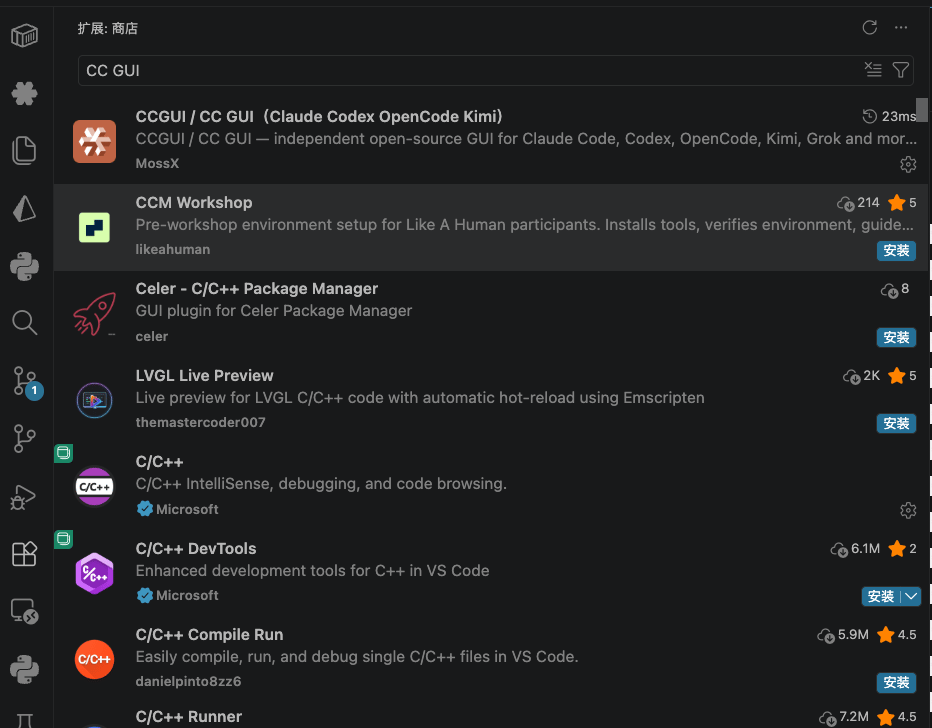 You can also open the Marketplace page in a browser and click **Install**:
[https://marketplace.visualstudio.com/items?itemName=MossX.vscode-cc-gui](https://marketplace.visualstudio.com/items?itemName=MossX.vscode-cc-gui)
## Confirm the install
After install you should see:
* A **CC GUI** icon in the Activity Bar
* A set of commands when you type `CC GUI` in the Command Palette
* An entry on the right side of the editor title bar that opens the panel
If the sidebar is empty, open a workspace folder first. CC GUI needs the workspace root for file mentions, sessions, and the working directory.
## Next step
Installing only adds the UI to VS Code. To send a message, continue with [Prepare your environment](/en/vscode/start/setup): check Node.js, install the Claude / Codex SDKs, and install local CLIs if you need them.
You can also open the Marketplace page in a browser and click **Install**:
[https://marketplace.visualstudio.com/items?itemName=MossX.vscode-cc-gui](https://marketplace.visualstudio.com/items?itemName=MossX.vscode-cc-gui)
## Confirm the install
After install you should see:
* A **CC GUI** icon in the Activity Bar
* A set of commands when you type `CC GUI` in the Command Palette
* An entry on the right side of the editor title bar that opens the panel
If the sidebar is empty, open a workspace folder first. CC GUI needs the workspace root for file mentions, sessions, and the working directory.
## Next step
Installing only adds the UI to VS Code. To send a message, continue with [Prepare your environment](/en/vscode/start/setup): check Node.js, install the Claude / Codex SDKs, and install local CLIs if you need them.