> ## Documentation Index
> Fetch the complete documentation index at: https://docs.mossx.ai/llms.txt
> Use this file to discover all available pages before exploring further.
# Generate a commit
> Use CC GUI to write a commit message from the current Git changes and fill it back into Source Control.
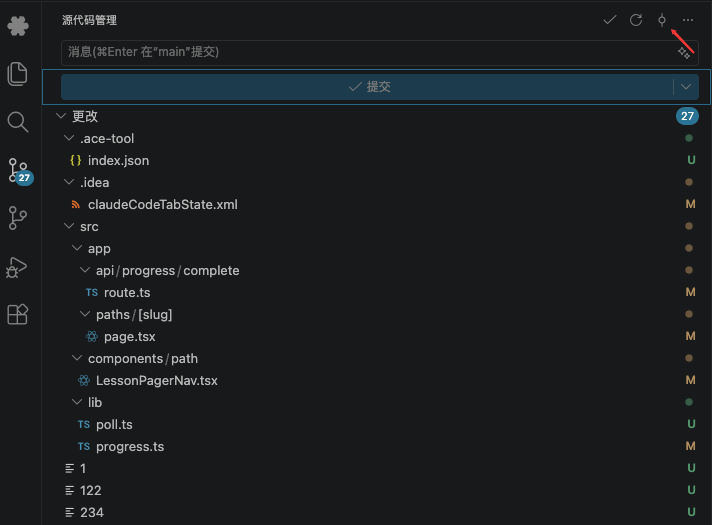
CC GUI can read the current workspace Git diff, generate a commit message, and write it into the VS Code Source Control input when possible.
 ## Check these first
1. The workspace is a Git repo and has uncommitted changes
2. **Settings → General → Behavior → AI-generated commit messages** is on
3. **Settings → Commit AI** already has a working provider and model
If you turn the master switch off, the command says the feature is disabled.
## Generate one commit message
Confirm the change list has files. With no diff, the command reports `No changes found`.
Click the CC GUI generate button in the Source Control title bar, or run **CC GUI: Generate Commit Message with Claude** from the Command Palette.
VS Code shows progress. While it generates, some text may stream into the commit input first.
On success, the input contains a cleaned-up commit message. If it cannot write into the SCM input, the text falls back to the CC GUI input box so you can copy it.
On failure, the extension drops the full prompt into the chat and explains why.
## Configure Commit AI
Open **Settings → Commit AI**:
* Choose a provider and model (Claude Code or Codex)
* Edit the global prompt
* Override the prompt per workspace
* Turn on the related code-review option if you need it
In the prompt you can lock the language, require a title format, or require a body.
Commit AI sends the diff to the selected model. Very large diffs are truncated. For a sensitive repo, review the prompt and provider first.
## Common issues
| Symptom | Cause |
| --------------------- | -------------------------------------------------------------------------------------------- |
| No workspace | Open a folder first |
| No changes | Stage something, or at least leave an uncommitted diff |
| No available provider | Configure [Claude](/en/vscode/providers/claude) or [Codex](/en/vscode/providers/codex) first |
| Button is missing | Confirm the current SCM provider is Git, and the master switch is on |
## Check these first
1. The workspace is a Git repo and has uncommitted changes
2. **Settings → General → Behavior → AI-generated commit messages** is on
3. **Settings → Commit AI** already has a working provider and model
If you turn the master switch off, the command says the feature is disabled.
## Generate one commit message
Confirm the change list has files. With no diff, the command reports `No changes found`.
Click the CC GUI generate button in the Source Control title bar, or run **CC GUI: Generate Commit Message with Claude** from the Command Palette.
VS Code shows progress. While it generates, some text may stream into the commit input first.
On success, the input contains a cleaned-up commit message. If it cannot write into the SCM input, the text falls back to the CC GUI input box so you can copy it.
On failure, the extension drops the full prompt into the chat and explains why.
## Configure Commit AI
Open **Settings → Commit AI**:
* Choose a provider and model (Claude Code or Codex)
* Edit the global prompt
* Override the prompt per workspace
* Turn on the related code-review option if you need it
In the prompt you can lock the language, require a title format, or require a body.
Commit AI sends the diff to the selected model. Very large diffs are truncated. For a sensitive repo, review the prompt and provider first.
## Common issues
| Symptom | Cause |
| --------------------- | -------------------------------------------------------------------------------------------- |
| No workspace | Open a folder first |
| No changes | Stage something, or at least leave an uncommitted diff |
| No available provider | Configure [Claude](/en/vscode/providers/claude) or [Codex](/en/vscode/providers/codex) first |
| Button is missing | Confirm the current SCM provider is Git, and the master switch is on |