> ## Documentation Index
> Fetch the complete documentation index at: https://docs.mossx.ai/llms.txt
> Use this file to discover all available pages before exploring further.
# Skills
> Import, enable, and disable skill packs so the model can load a specialized workflow on demand.
Skills are on-demand skill packs. They teach the model a class of repeatable tasks, such as a release check, commit conventions, or in-repo scaffolding.
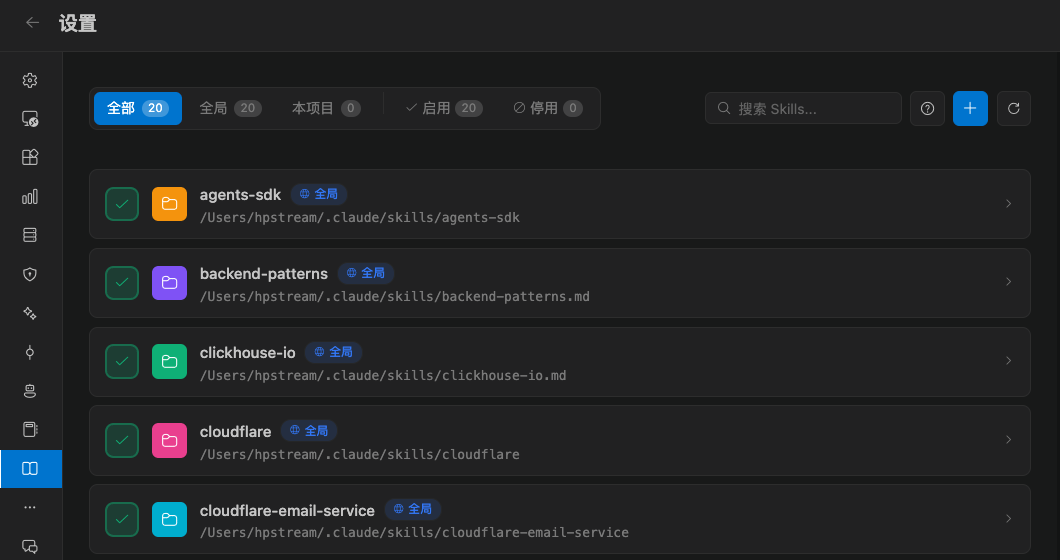
Open **Settings → Skills**. Full management is centered on Claude Code.
 ## Where skills come from
The list is grouped by scope:
| Scope | Meaning |
| ------------------- | ------------------------------------- |
| Global / user | Applies to workspaces on this machine |
| This project / repo | Applies only to the current workspace |
Use the top filter to show all, enabled only, or disabled only. You can also search by name.
## Import a skill
Click import and choose a target scope:
* Import as a global / user skill
* Import as a project / repo skill
You get a message on success, partial success, or failure. If the name already exists or the format is wrong, read the error and try again.
Skill packs should come from a source you trust. Read the description and the commands it will run before you import.
## Enable and disable
Each skill has its own switch. After you disable it, the model no longer loads it, but the files stay so you can turn it back on.
Delete removes the skill from that scope and cannot be undone. Global and project deletes use different confirmation copy. Read it before you confirm.
## How this differs from Agents and prompts
| Capability | When to use it |
| -------------- | ------------------------------------------------- |
| Skills | A reusable workflow the model loads on demand |
| Agents | A fixed persona and tool setup, selected with `#` |
| Prompt library | Insertable text, inserted with `!` |
You can use all three together: an Agent for the role, a Skill for the workflow, and a prompt for this turn's context. See [Agents and the prompt library](/en/vscode/customize/agents-prompts).
## Where skills come from
The list is grouped by scope:
| Scope | Meaning |
| ------------------- | ------------------------------------- |
| Global / user | Applies to workspaces on this machine |
| This project / repo | Applies only to the current workspace |
Use the top filter to show all, enabled only, or disabled only. You can also search by name.
## Import a skill
Click import and choose a target scope:
* Import as a global / user skill
* Import as a project / repo skill
You get a message on success, partial success, or failure. If the name already exists or the format is wrong, read the error and try again.
Skill packs should come from a source you trust. Read the description and the commands it will run before you import.
## Enable and disable
Each skill has its own switch. After you disable it, the model no longer loads it, but the files stay so you can turn it back on.
Delete removes the skill from that scope and cannot be undone. Global and project deletes use different confirmation copy. Read it before you confirm.
## How this differs from Agents and prompts
| Capability | When to use it |
| -------------- | ------------------------------------------------- |
| Skills | A reusable workflow the model loads on demand |
| Agents | A fixed persona and tool setup, selected with `#` |
| Prompt library | Insertable text, inserted with `!` |
You can use all three together: an Agent for the role, a Skill for the workflow, and a prompt for this turn's context. See [Agents and the prompt library](/en/vscode/customize/agents-prompts).