> ## Documentation Index
> Fetch the complete documentation index at: https://docs.mossx.ai/llms.txt
> Use this file to discover all available pages before exploring further.
# CC GUI for VS Code
> Use Claude Code, Codex, OpenCode, Kimi, Grok, and Pi from a graphical interface inside VS Code.
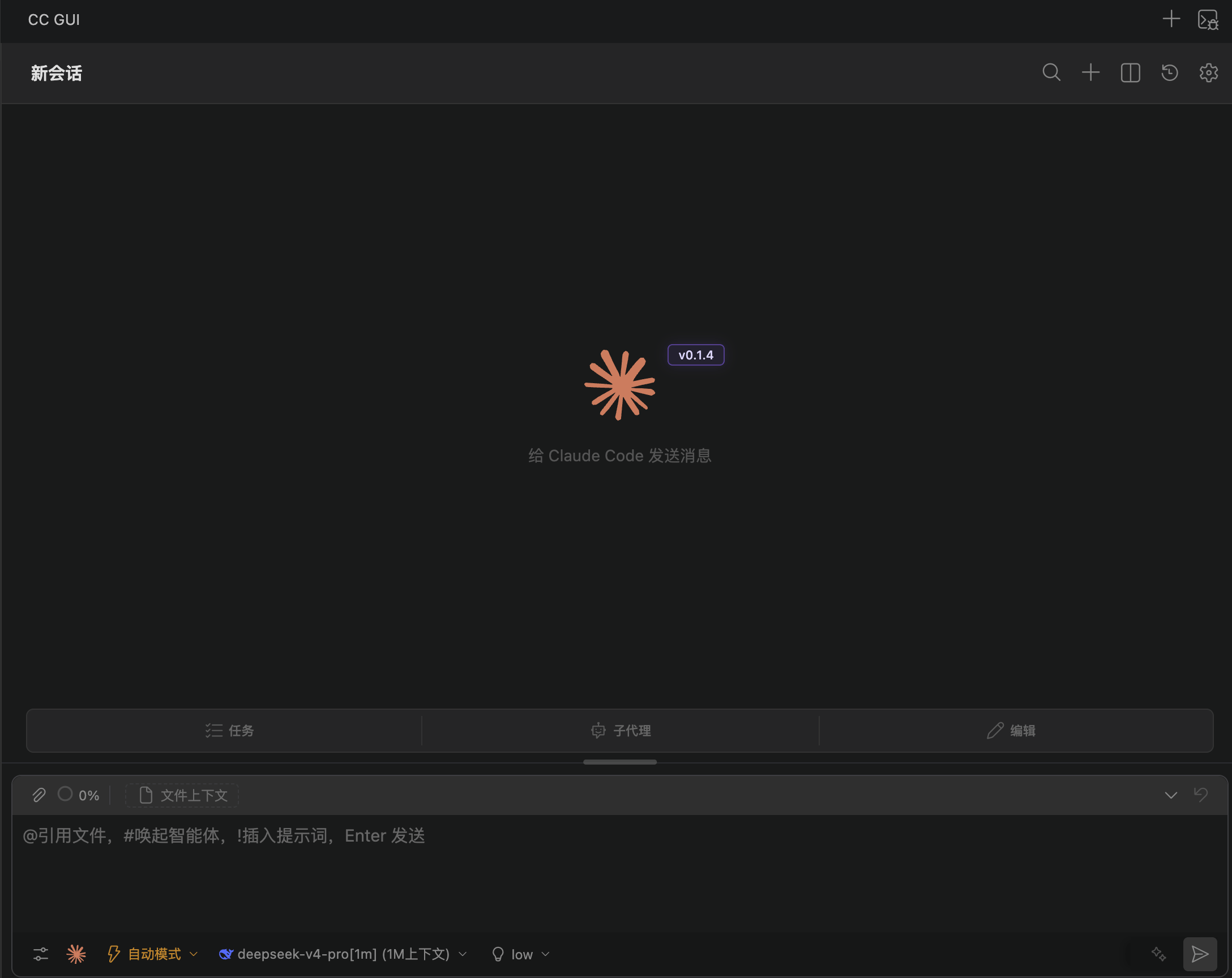
**CC GUI** (also **CCGUI** / **ccgui**) is an open-source graphical interface for multiple CLIs. The VS Code client is an extension, so you can chat in the sidebar or an editor tab instead of staying in the terminal.
The current extension ID is `MossX.vscode-cc-gui`. The display name is **CCGUI / CC GUI(Claude Codex OpenCode Kimi)**.
CC GUI is an independent open-source project. It is not affiliated with, endorsed by, or sponsored by Anthropic, OpenAI, Microsoft, or other third-party tool vendors.
 ## What it can do
* Chat with Claude Code and Codex directly in VS Code.
* Detect and call locally installed Grok, Kimi, OpenCode, and Pi CLIs.
* Use `@` to cite files, `/` for slash commands, `#` to pick an agent, and `!` to insert prompts.
* Manage MCP, Skills, Agents, the prompt library, and permission prompts.
* Send editor selections, file paths, diagnostics, and Git changes into the chat.
## Supported runtimes
| Type | Name | Depends on |
| --------- | ------------------------------------------ | -------------------------------- |
| SDK | [Claude Code](/en/vscode/providers/claude) | `@anthropic-ai/claude-agent-sdk` |
| SDK | [Codex](/en/vscode/providers/codex) | `@openai/codex-sdk` |
| Local CLI | [Kimi](/en/vscode/providers/kimi) | `kimi` on your system |
| Local CLI | [Grok](/en/vscode/providers/grok) | `grok` on your system |
| Local CLI | [OpenCode](/en/vscode/providers/opencode) | `opencode` on your system |
| Local CLI | [Pi](/en/vscode/providers/pi) | `pi` on your system |
A Gemini copy entry exists, but Gemini is not shipped as a standalone runtime. This V1 documentation does not cover it.
## How it relates to other clients
CC GUI also has a JetBrains plugin, a standalone desktop app, and a mobile client. Chat, providers, MCP, and Skills are shared ideas across clients. The Activity Bar, editor context menu, and the Commit button in Source Control belong to VS Code only.
This series covers the VS Code client only. See [JetBrains overview](/en/jetbrains/index) and [desktop overview](/en/desktop/index). Sidebar groups: Get started, Guides, Providers / CLI, Advanced, Community.
## Start here
Install CCGUI from the VS Code Marketplace.
Set up Node.js 20+, the SDKs, and optional CLIs.
Separate pages for Claude, Codex, Kimi, Grok, OpenCode, and Pi.
Choose a provider, add credentials, and finish the first chat.
Sidebar, tabs, and the Chat / History / Settings views.
## What it can do
* Chat with Claude Code and Codex directly in VS Code.
* Detect and call locally installed Grok, Kimi, OpenCode, and Pi CLIs.
* Use `@` to cite files, `/` for slash commands, `#` to pick an agent, and `!` to insert prompts.
* Manage MCP, Skills, Agents, the prompt library, and permission prompts.
* Send editor selections, file paths, diagnostics, and Git changes into the chat.
## Supported runtimes
| Type | Name | Depends on |
| --------- | ------------------------------------------ | -------------------------------- |
| SDK | [Claude Code](/en/vscode/providers/claude) | `@anthropic-ai/claude-agent-sdk` |
| SDK | [Codex](/en/vscode/providers/codex) | `@openai/codex-sdk` |
| Local CLI | [Kimi](/en/vscode/providers/kimi) | `kimi` on your system |
| Local CLI | [Grok](/en/vscode/providers/grok) | `grok` on your system |
| Local CLI | [OpenCode](/en/vscode/providers/opencode) | `opencode` on your system |
| Local CLI | [Pi](/en/vscode/providers/pi) | `pi` on your system |
A Gemini copy entry exists, but Gemini is not shipped as a standalone runtime. This V1 documentation does not cover it.
## How it relates to other clients
CC GUI also has a JetBrains plugin, a standalone desktop app, and a mobile client. Chat, providers, MCP, and Skills are shared ideas across clients. The Activity Bar, editor context menu, and the Commit button in Source Control belong to VS Code only.
This series covers the VS Code client only. See [JetBrains overview](/en/jetbrains/index) and [desktop overview](/en/desktop/index). Sidebar groups: Get started, Guides, Providers / CLI, Advanced, Community.
## Start here
Install CCGUI from the VS Code Marketplace.
Set up Node.js 20+, the SDKs, and optional CLIs.
Separate pages for Claude, Codex, Kimi, Grok, OpenCode, and Pi.
Choose a provider, add credentials, and finish the first chat.
Sidebar, tabs, and the Chat / History / Settings views.