> ## Documentation Index
> Fetch the complete documentation index at: https://docs.mossx.ai/llms.txt
> Use this file to discover all available pages before exploring further.
# Send the first message
> Add a project, choose a provider, and finish the first chat in the desktop app.
Once the environment is ready, use the shortest path to prove the app works: add a project → choose a provider → send a message.
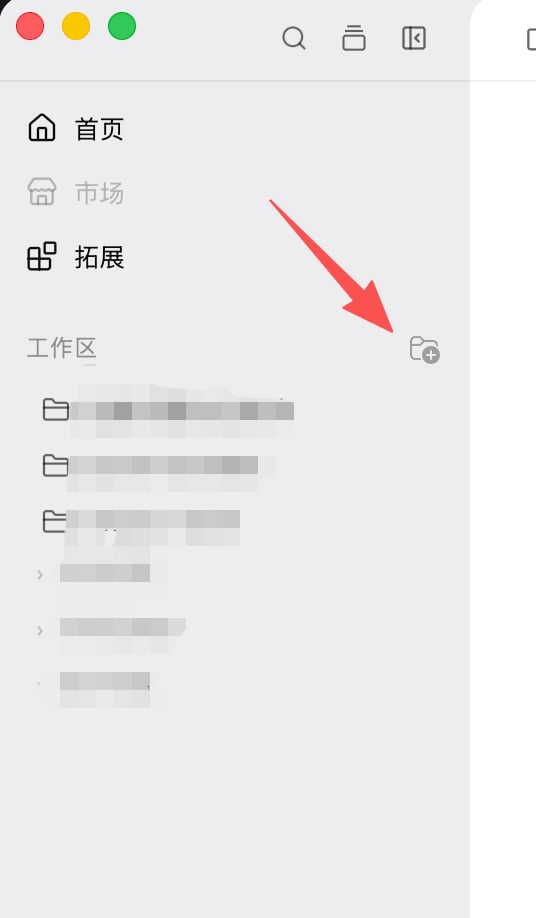
## Open a project
1. Launch **ccgui**
2. On Home, pick an existing workspace or **Add project**
3. After you enter the project, the chat canvas is in the middle and the input is at the bottom
 ## Choose a provider
Open the provider / model picker at the bottom of the input and pick one:
## Choose a provider
Open the provider / model picker at the bottom of the input and pick one:
 | Goal | Choose | Still needed |
| ---------------- | ------------------------------- | ----------------------------------------------------------------------------- |
| Fastest check | **Claude Code** | An API key or CLI login |
| OpenAI ecosystem | **Codex** | Codex config or `~/.codex/` |
| Local CLI | **Kimi / Grok / OpenCode / Pi** | The command on PATH, plus a local config or provider in **CLI configuration** |
| Host runtime | **DeepSeek Harness** | DSH running and host/port reachable |
For the first try, use Claude Code. Per-engine notes: [Providers / CLI](/en/desktop/providers/overview).
## Send a short message
In the input, type:
```text theme={null}
Describe this project's stack in one sentence.
```
Press `Enter` to send. If you changed the send shortcut to `Cmd/Ctrl+Enter`, use that instead.
When it works you will see:
1. Your message in the chat
2. Status change to thinking or tool use
3. A streaming assistant reply
| Goal | Choose | Still needed |
| ---------------- | ------------------------------- | ----------------------------------------------------------------------------- |
| Fastest check | **Claude Code** | An API key or CLI login |
| OpenAI ecosystem | **Codex** | Codex config or `~/.codex/` |
| Local CLI | **Kimi / Grok / OpenCode / Pi** | The command on PATH, plus a local config or provider in **CLI configuration** |
| Host runtime | **DeepSeek Harness** | DSH running and host/port reachable |
For the first try, use Claude Code. Per-engine notes: [Providers / CLI](/en/desktop/providers/overview).
## Send a short message
In the input, type:
```text theme={null}
Describe this project's stack in one sentence.
```
Press `Enter` to send. If you changed the send shortcut to `Cmd/Ctrl+Enter`, use that instead.
When it works you will see:
1. Your message in the chat
2. Status change to thinking or tool use
3. A streaming assistant reply
 ## References you can try first
* Type `@` to search and attach a project file
* Drag a file from the file tree into the input
* Type `/` to try a slash command
* Type `!` to try a prompt; pick an agent from the input toolbar; type `@@` to try project memory
## References you can try first
* Type `@` to search and attach a project file
* Drag a file from the file tree into the input
* Type `/` to try a slash command
* Type `!` to try a prompt; pick an agent from the input toolbar; type `@@` to try project memory
 ## If nothing comes back
| Prompt | Cause | Next step |
| ---------------------------- | ---------------------------------------------- | ---------------------------------------------------------------------------------------------------------- |
| Provider not configured | The current runtime has no working credentials | [Prepare your environment](/en/desktop/start/setup) or [Provider overview](/en/desktop/providers/overview) |
| CLI not installed | The matching binary is missing | [Detect and install](/en/desktop/providers/cli) |
| No workspace | You have not added a project | [Prepare your environment](/en/desktop/start/setup) |
| Permission dialog stays open | Default mode is waiting for you | [Modes and permissions](/en/desktop/chat/modes) |
More troubleshooting: [FAQ](/en/desktop/community/faq).
## Next steps
* [Learn the interface](/en/desktop/start/interface)
* [Chat area](/en/desktop/chat/overview)
* [Input](/en/desktop/chat/input)
## If nothing comes back
| Prompt | Cause | Next step |
| ---------------------------- | ---------------------------------------------- | ---------------------------------------------------------------------------------------------------------- |
| Provider not configured | The current runtime has no working credentials | [Prepare your environment](/en/desktop/start/setup) or [Provider overview](/en/desktop/providers/overview) |
| CLI not installed | The matching binary is missing | [Detect and install](/en/desktop/providers/cli) |
| No workspace | You have not added a project | [Prepare your environment](/en/desktop/start/setup) |
| Permission dialog stays open | Default mode is waiting for you | [Modes and permissions](/en/desktop/chat/modes) |
More troubleshooting: [FAQ](/en/desktop/community/faq).
## Next steps
* [Learn the interface](/en/desktop/start/interface)
* [Chat area](/en/desktop/chat/overview)
* [Input](/en/desktop/chat/input)