> ## Documentation Index
> Fetch the complete documentation index at: https://docs.mossx.ai/llms.txt
> Use this file to discover all available pages before exploring further.
# Claude Code
> Configure a hosted provider, local config, or CLI login for Claude Code.
Claude Code is the most complete mainline runtime in the desktop app: permission dialogs, plan, MCP, Skills, and rewind / fork all go through it.
## How to connect
Open **Settings → CLI configuration → Claude Code CLI**:
1. **Add provider**: name, API key, base URL, model mapping. Hosted config lives in `~/.ccgui/config.json` and does not change `~/.claude/settings.json`
2. **Use local settings.json**: with no third-party provider, the default is `~/.claude/settings.json`
3. **CLI login**: for a subscription account, log in to Claude CLI in a terminal first, then let the app reuse that login
4. **Third-party / proxy presets**: Zhipu, Kimi, DeepSeek, MiniMax, OpenRouter, Bailian, LongCat, OpenCode Go, and others
Official direct traffic goes to Anthropic. Third-party presets immediately route to the matching endpoint and label the routing in the UI. If `claude` is not installed, click **Install** on that page. You can override the Claude CLI path.
## Install
macOS / Linux:
```bash theme={null}
curl -fsSL https://claude.ai/install.sh | bash
```
Windows PowerShell:
```powershell theme={null}
irm https://claude.ai/install.ps1 | iex
```
Docs: [Claude Code CLI](https://code.claude.com/docs/en/cli-reference)
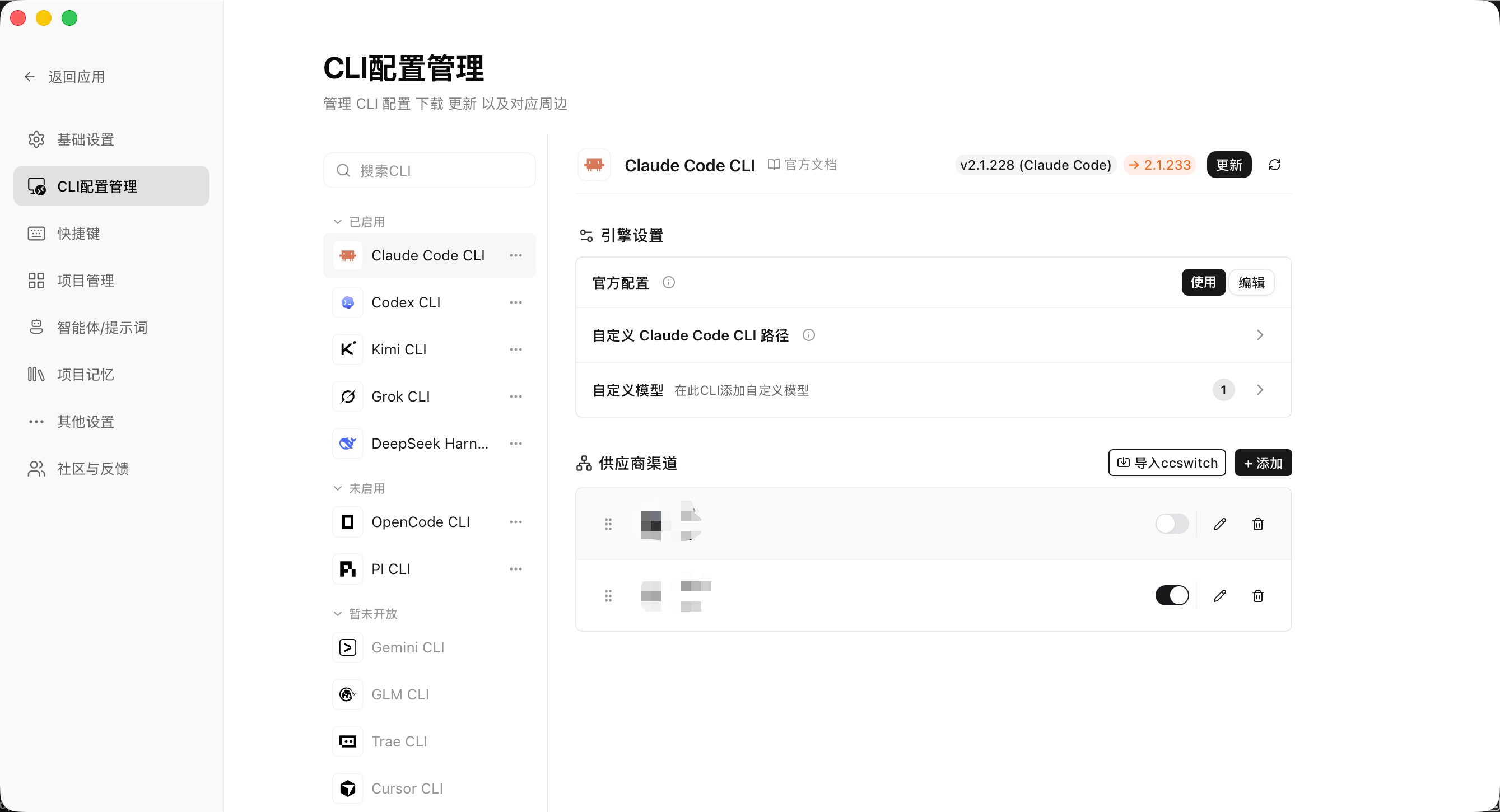 Config stays on this computer. The app does not upload keys to a CC GUI server.
## Models and usage
The model picker lists models for the current profile. You can pin common models and add prices so usage stats can estimate cost.
## Working directory and grants
* The default working directory is the current workspace root
* Reads and writes outside that root may trigger a [Directory Grant](/en/desktop/chat/modes#directory-grant)
* You can override the Claude CLI path in Settings (advanced)
## Next steps
* [Provider overview](/en/desktop/providers/overview)
* [Detect and install](/en/desktop/providers/cli)
* [Modes and permissions](/en/desktop/chat/modes)
* [MCP](/en/desktop/customize/mcp)
* [Skills](/en/desktop/customize/skills)
Config stays on this computer. The app does not upload keys to a CC GUI server.
## Models and usage
The model picker lists models for the current profile. You can pin common models and add prices so usage stats can estimate cost.
## Working directory and grants
* The default working directory is the current workspace root
* Reads and writes outside that root may trigger a [Directory Grant](/en/desktop/chat/modes#directory-grant)
* You can override the Claude CLI path in Settings (advanced)
## Next steps
* [Provider overview](/en/desktop/providers/overview)
* [Detect and install](/en/desktop/providers/cli)
* [Modes and permissions](/en/desktop/chat/modes)
* [MCP](/en/desktop/customize/mcp)
* [Skills](/en/desktop/customize/skills)