> ## Documentation Index
> Fetch the complete documentation index at: https://docs.mossx.ai/llms.txt
> Use this file to discover all available pages before exploring further.
# CC GUI desktop overview
> Use Claude Code, Codex, OpenCode, Grok, Kimi, Pi, and DeepSeek Harness from one standalone desktop app.
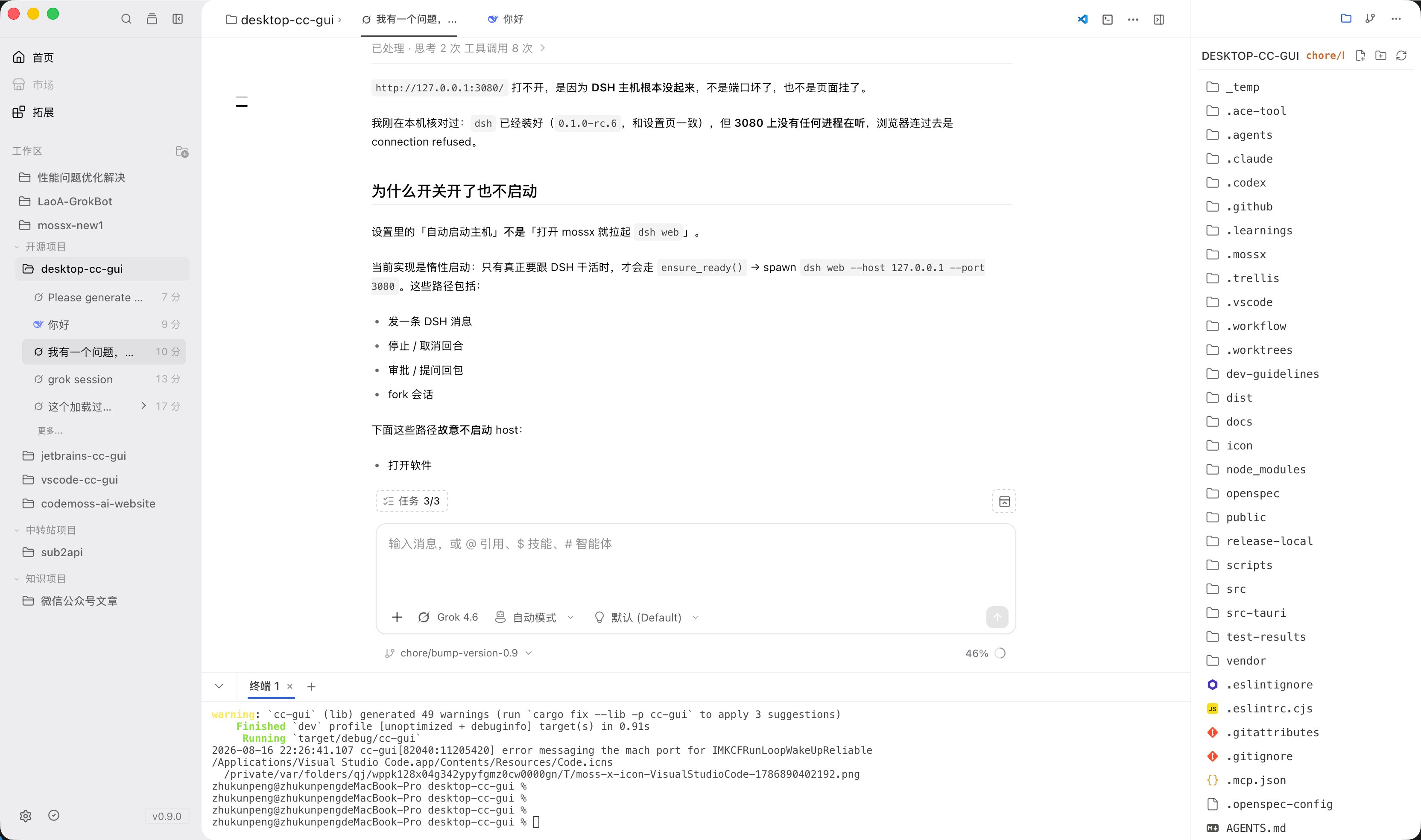
The **CC GUI desktop app** (app name **ccgui**, also **CCGUI** / **ccgui**) is an open-source AI coding desktop application. It puts several command-line AI coding runtimes into one graphical interface, so you can write code, fix bugs, and commit to Git in a chat-style workflow.
The current app identifier is `com.zhukunpenglinyutong.ccgui`. It is built with **Tauri 2 + React + Rust** and supports macOS / Windows / Linux.
CC GUI is an independent open-source project. It is not affiliated with, endorsed by, or sponsored by Anthropic, OpenAI, Google, or other third-party tool vendors.
 ## What it can do
* Switch among Claude Code, Codex, OpenCode, Grok, Kimi, Pi, DeepSeek Harness, and other runtimes in one app.
* Use `@` to cite files, `@@` for project memory, `@#` for notes, `/` for slash commands, `$` for skills, and `!` for prompts. Agents are usually chosen from the input toolbar.
* Built-in file tree, terminal, Git panel, global search, and Plan panel.
* Manage configured MCP servers, Skills, Agents, the prompt library, and permission prompts.
* Desktop-only features such as the project knowledge map, project memory, and context ledger.
* In-app auto-update.
## Supported runtimes
| Status | Name | Notes |
| ----------- | ---------------------- | ------------------------------------------------------------------------------------- |
| Available | Claude Code | The most complete primary runtime |
| Available | Codex CLI | OpenAI Codex ecosystem |
| Available | Kimi CLI | Local `kimi` |
| Available | Grok CLI | Local `grok` |
| Available | OpenCode | Local `opencode` (can be moved to **Disabled**) |
| Available | PI CLI | Local `pi` |
| Available | DeepSeek Harness (DSH) | Host runtime (host/port) |
| Coming soon | Gemini CLI and others | Shown in the **Coming soon** group. This documentation does not treat them as shipped |
The MCP / Plugin marketplace entry is still **Coming Soon**. The README note that Gemini is enabled by default is outdated. Follow the desktop Settings page.
## How it relates to other clients
CC GUI also has a VS Code extension, a JetBrains plugin, and a mobile client. Chat and provider concepts are similar. The file tree, built-in terminal, project knowledge map, project memory, and multi-workspace management belong to the desktop app only.
On configuration: the provider structure in `~/.ccgui/config.json` can be shared with the JetBrains client. Sessions and UI state are not guaranteed to stay in sync across clients.
This series covers the desktop app only. Sidebar groups: Get started, Guides, Providers / CLI, Advanced, Community. Each engine has its own page. Detection and install share one page.
## Start here
Install the macOS / Windows / Linux package from GitHub Releases.
Set up runtimes, API keys, and each engine CLI.
Separate pages for Claude, Codex, Kimi, Grok, OpenCode, Pi, and DSH.
Add a project, choose a provider, and finish the first chat.
Home, chat, file tree, Git, terminal, and Settings.
## What it can do
* Switch among Claude Code, Codex, OpenCode, Grok, Kimi, Pi, DeepSeek Harness, and other runtimes in one app.
* Use `@` to cite files, `@@` for project memory, `@#` for notes, `/` for slash commands, `$` for skills, and `!` for prompts. Agents are usually chosen from the input toolbar.
* Built-in file tree, terminal, Git panel, global search, and Plan panel.
* Manage configured MCP servers, Skills, Agents, the prompt library, and permission prompts.
* Desktop-only features such as the project knowledge map, project memory, and context ledger.
* In-app auto-update.
## Supported runtimes
| Status | Name | Notes |
| ----------- | ---------------------- | ------------------------------------------------------------------------------------- |
| Available | Claude Code | The most complete primary runtime |
| Available | Codex CLI | OpenAI Codex ecosystem |
| Available | Kimi CLI | Local `kimi` |
| Available | Grok CLI | Local `grok` |
| Available | OpenCode | Local `opencode` (can be moved to **Disabled**) |
| Available | PI CLI | Local `pi` |
| Available | DeepSeek Harness (DSH) | Host runtime (host/port) |
| Coming soon | Gemini CLI and others | Shown in the **Coming soon** group. This documentation does not treat them as shipped |
The MCP / Plugin marketplace entry is still **Coming Soon**. The README note that Gemini is enabled by default is outdated. Follow the desktop Settings page.
## How it relates to other clients
CC GUI also has a VS Code extension, a JetBrains plugin, and a mobile client. Chat and provider concepts are similar. The file tree, built-in terminal, project knowledge map, project memory, and multi-workspace management belong to the desktop app only.
On configuration: the provider structure in `~/.ccgui/config.json` can be shared with the JetBrains client. Sessions and UI state are not guaranteed to stay in sync across clients.
This series covers the desktop app only. Sidebar groups: Get started, Guides, Providers / CLI, Advanced, Community. Each engine has its own page. Detection and install share one page.
## Start here
Install the macOS / Windows / Linux package from GitHub Releases.
Set up runtimes, API keys, and each engine CLI.
Separate pages for Claude, Codex, Kimi, Grok, OpenCode, Pi, and DSH.
Add a project, choose a provider, and finish the first chat.
Home, chat, file tree, Git, terminal, and Settings.